I'm a back-end programmer. I deal with databases and servers, and I think a terminal window is a perfectly reasonable interface. And my normal creativity outlets are writing and, yes, programming.
As you might imagine then, CAD programs fill me with dread. They seem so cool! And yet, I spend vastly more time learning how to do basic stuff in them then I ever spend doing said stuff. I keep thinking, "Can't I just write a program to do this?"
And the answer, it turns out, is yes. If you use OpenSCAD. I learned about it from Make magazine's special issue on 3D printers (a topic I'm this close to really digging into). While a real CAD user may find it limiting, someone like me, who works in programming languages and usually has no design more complex than a mechanical puzzle piece, it's perfect. You -- get this! -- just write a program to do all the work you need! You refactor with variables, functions, and macros, and you provide instructions through a declarative programming language.
Finally, a CAD tool that works the way I do.
Showing posts with label Miscellaneous. Show all posts
Showing posts with label Miscellaneous. Show all posts
Monday, December 23, 2013

Friday, April 19, 2013
Awkward And Upward
The subject of awk, a text-processing tool on UNIX systems, came up recently in a number of contexts — a book I was reading, a test harness at work, and a blog post I had bookmarked — and I decided it was time to learn a bit more about it. Like anyone who's been around servers for a while, I've used awk here and there, but never in earnest.
So I picked up sed & awk and worked through the code. (An aside: The book is 16 years old at this point; it's fascinating to remind oneself what the "download the source code" options were at the time: FTP, UUCP, and more, but not HTTP. But downloading code samples is a less effective learning strategy for me compared to typing it in myself.)
I'm sold. I've written any number of little Ruby scripts for processing text files over the years, but awk is a DSL designed just for this purpose. awk handles the mechanical aspects of opening a file and reading in each line. You write the business logic you care about.
Here's an example: As an exercise, I took a Ruby script I had written to extract stack traces from a Java thread dump and rewrote it in awk. I wanted every stack trace where any line in the trace matched the regex I passed in. This is useful for, say, finding every thread that uses a particular library or stems from a particular source or goes through a particular code path. A Java server can have hundreds of threads, which can make it tough to focus on one subsection of code. This lets me zero in on the stacks I care about.
# extracts bits of a thread dump based on a passed in regex
# usage: awk -f extract_stacks_by_regex -v regex=[regex] [file]

# lines with stuff when we've established we're in a stack dump that matches the regex
$0 ~ /^..*$/ && matches == 1 {
   print
}

# lines with stuff when we haven't yet found a match: build up current stack and check to see if this is a match
$0 ~ /^..*$/ && matches == 0 {
   current_stack = current_stack "\n" $0
   if ($0 ~ regex) {
      matches = 1
      print current_stack
   }
}

# lines without stuff: reset
/^$/ {matches = 0;current_stack = ""}
This script is about half the size of the Ruby version.
As someone who's often digging into logs or massaging data for visualizations, a few hours of time getting really solid with awk will no doubt pay for itself over and over again.
As someone who's often digging into logs or massaging data for visualizations, a few hours of time getting really solid with awk will no doubt pay for itself over and over again.
Sunday, February 10, 2013
All Together Now: A Look at Concurrent Languages
Over the past several months, I've been taking a look at various languages that advertise easy concurrency and scalability. It's too late to use any of them on SimCity, but I'm always thinking about what I'll build next and how I'll build it, and these languages are on my radar. Java is increasingly cumbersome to me as a language, and its concurrency constructs are too error-prone even for senior programmers, not to mention that the thread model Java exposes has serious performance issues if not carefully managed.
Here's my quick take on the three languages I focused on: Erlang, Scala, and Go. The TL;DR version: I'd use Erlang for infrastructure in a heartbeat, Scala will make your developers more productive at the possible expense of application performance, and Go is fast but less fun to work in.
For each language, I worked through at least one book on the subject and then built something for myself. The personal projects ranged from small to sizable.
Erlang
Erlang was my favorite of the three languages, and it would be hard to ever argue against using Erlang for back-end infrastructure pieces that require high scalability. Say, message queues, or chat systems, or NoSQL databases, or the backbones of prominent first-person shooters.Like all these languages, it has a high-level abstraction for concurrency, but, unlike the others, it easily supports passing messages between machines, which bodes well for a cluster of servers. It has extensive fault tolerance mechanisms, even across machines, allowing for robust systems. It has support for hot code swapping, opening the possibility of upgrading a system while it's still live and reducing maintenance windows to nil. It has great support for extracting values out of binary data, which is invaluable when dealing with network traffic and proprietary data formats. It's a mature, proven technology. And it has the benefits of functional programming: more concise code that reduces the number of potential bugs and immutable objects that prevent weird thread-safety issues.
On the other hand, I can probably count on one hand the number of other Erlang programmers I've met. And it's not like taking a C programmer and teaching them Java; functional programming is a distinct mental shift from imperative programming, and it can be hard to get your head around it. That means that you can write your Erlang code all you want, but what about the people who will have to maintain your system beyond you? Its small community also means that while there are certainly lots of third-party libraries for it, it's not the vast universe that Java enjoys. And while immutable objects are easy to work with, they're also expensive because new ones are constantly being made.
Scala
While Twitter's Scala School argues for treating Scala as a separate language, it's hard not to compare it to Java, since it compiles down to Java bytecode and runs on the same virtual machine. And in terms of developer productivity, Scala rockets past Java in my book.As an application layer language, it has tremendous advantages. You can accomplish complicated tasks with much fewer keystrokes. You can use functional paradigms and immutable objects, but also use imperative style and mutable objects if you need performance, or, crucially, if you need to bring another developer on board with your system. You can enjoy the same concurrency abstraction Erlang provides. You can leverage Java's seemingly infinite supply of open-source libraries. You can incorporate it into an existing Java application, giving you the ability to bring it in without rewriting everything. You can even easily build internal DSLs with it to make your system more expressive and easier to maintain.
But, in my own experiments and in anecdotal evidence, it suffers from sluggish performance. All that great functionality makes your developers more productive, but potentially at the expense of speed. This makes sense; all that pretty code needs to be contorted and converted into Java with who-knows-how-many object creations along the way. Obviously Twitter and Foursquare manage to be fairly fast, but how much engineering time is spent to get them there? On the other hand, a system that enjoys greater and easier concurrency than Java might be more scalable and have more consistent performance under load, even if any given call could be faster in another language.
Go
Go is Google's attempt to build a better C, with a focus on developing distributed systems at a scale that Google needs. Its concurrency model is distinct from Erlang and Scala's, preferring the notion of Communicating Sequential Processes to the Actor model, but neither is particularly superior; each has strengths and weaknesses that fit different situations.The big win with Go is its speed: Go programs are compiled down to machine code. And while the built-in garbage collection probably means that C would win a horse race between the two, Go is a much less error-prone language to work in. Its community is still young, but it seems eager to improve the language, and a wide variety of useful go libraries already exist. It's hard to compete with the many years of robust Java libraries out there, but Go nuts seem to have filled in the most obvious needs.
I have to admit that I dislike working in the language itself; it lacks the cleanliness of Erlang and the depth of Scala. But there's no denying that its concurrency model is easy to work with, and the programs that you create are nice and zippy relative to their Java counterparts.
Others
I've yet to dig deep into Clojure, though it's the obvious next one. I figure if I'm going to be a fan of functional programming, I might as well go into crazy Lisp land. But I'd worry that it would suffer from the same performance problems — for the same reasons — as Scala.
It seems funny to mention node.js in this post, since in some ways it's all about zero concurrency: a single thread of execution is all you get. Of course, under the hood there's lots of asynchronous work, but it's tied directly to the operating system's I/O. We use it for a subsystem in SimCity, and it, like everything, has strengths and weaknesses. It can do lots of I/O tasks concurrently. Lots. But it's very sensitive to slow code, since that code will block the entire thread when it runs. It appeals to the game developers on my team, since single threads, event loops, and performance-sensitive code are the norm for them.
However, it's not very mature, and the libraries for it can be buggy and incomplete at this stage. I think we made the right decision switching our SimCity subsystem to node.js, since it outperforms its Java predecessor by a long shot, but it hasn't been simple or without issues.
Sunday, September 16, 2012
Tsung vs. JMeter
I first learned of tsung from a colleague in EA's Pogo division, and I was intrigued by his description of the load it could generate. I've been pushing it at Maxis as a result.
There's sound architectural reasoning for its abilities. It's written in Erlang, which delivers highly concurrent systems by eschewing the use of threads in favor of events. The various Java-based loadtesting tools use threads to simulate users, which necessarily limits their abilities.
There's also good anecdotal evidence favoring tsung, not only from the Pogo folks but also from the fact that it's used to loadtest ejabberd, the chat system Facebook uses that is generally considered to be the most scalable around. (It's also written in Erlang)
But how much better is it than JMeter, the go-to Java-based loadtesting tool? JMeter is probably easier to configure -- it has a GUI versus moderately documented XML -- and it probably has a richer feature set. So is it worth going to tsung?
There are some numbers out there, such as this slideshow, which found that tsung could generate up to 50,000 simultaneous users while JMeter couldn't go above 1,000 requests per second, but I wanted to find out for myself.
I set up a simple web server (mochiweb, an Erlang-based web server that also has a good scalability track record -- sensing a pattern here?) that served a simple, static page. Remember the goal wasn't to test the server under load; it was to test how much load the clients could generate. I also ran top to get a sense of how much CPU my process was using. There are probably lots of things wrong with my methodology, but, again, I just wanted a sense of the difference.
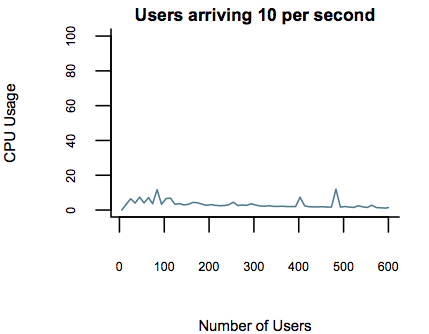
Here's some graphs I made comparing CPU usage by tsung for given rates of users. This was on my MacBook Pro with a minimal set of other applications open.
Note that the numbers on the x-axis show the number of users up to that point. The web server responds very quickly in this scenario, so the number of simultaneous users is probably very small.

JMeter Graphs
There's sound architectural reasoning for its abilities. It's written in Erlang, which delivers highly concurrent systems by eschewing the use of threads in favor of events. The various Java-based loadtesting tools use threads to simulate users, which necessarily limits their abilities.
There's also good anecdotal evidence favoring tsung, not only from the Pogo folks but also from the fact that it's used to loadtest ejabberd, the chat system Facebook uses that is generally considered to be the most scalable around. (It's also written in Erlang)
But how much better is it than JMeter, the go-to Java-based loadtesting tool? JMeter is probably easier to configure -- it has a GUI versus moderately documented XML -- and it probably has a richer feature set. So is it worth going to tsung?
There are some numbers out there, such as this slideshow, which found that tsung could generate up to 50,000 simultaneous users while JMeter couldn't go above 1,000 requests per second, but I wanted to find out for myself.
I set up a simple web server (mochiweb, an Erlang-based web server that also has a good scalability track record -- sensing a pattern here?) that served a simple, static page. Remember the goal wasn't to test the server under load; it was to test how much load the clients could generate. I also ran top to get a sense of how much CPU my process was using. There are probably lots of things wrong with my methodology, but, again, I just wanted a sense of the difference.
Here's some graphs I made comparing CPU usage by tsung for given rates of users. This was on my MacBook Pro with a minimal set of other applications open.
Note that the numbers on the x-axis show the number of users up to that point. The web server responds very quickly in this scenario, so the number of simultaneous users is probably very small.
Tsung Graphs


And here are the graphs I could collect from JMeter, which I configured via the GUI and then ran in command-line mode. Once I tried to get to 100 users per second, the JVM never had enough memory to create all the threads, no matter how I adjusted the heap size. This is, of course, the other major resource that threads consume.
So tsung, even on my machine, could handle about 50 times more users than JMeter, which is roughly consistent with the numbers in the report I link to above. That said, for tiny amounts of load, JMeter compares favorably with tsung and is a lot quicker to get up and running.
JMeter Graphs

I've noticed a tendency in Java shops to rely solely on tools written in Java. It drives me crazy; why put blinders on to a big chunk of software universe? I (more or less) like Java; I use it all the time. But it's not good for everything, and it's worth knowing what else is out there that might be better at solving the problem at hand.
Yes, tsung is "harder" than JMeter. It's written in another language. Boo hoo. Use the tool that makes sense; in this case it's hard to argue with tsung's capabilities.
Tuesday, May 18, 2010
We Rule: Maximize Your Time
I've been playing We Rule on my iPhone. I have to say, I don't really get the point of it. It seems like the only way to progress is to plant and harvest crops and exchange services with other players. But there are tons of things like trees and banners and what not that don't seem to do anything. Should I place a water tower? Who knows?
But this is not a game review. When you plant items and harvest them, you get paid some amount of gold depending on the crop. Planting each crop takes some defined amount of money (usually), and each crop requires some defined amount of real-world time to mature.
So, naturally, I wondered: Which plants are the best investment?
A simple spreadsheet offers the answer*. I wrote down the profit of the crop and divided that by the number of minutes it would take to grow. I did the same thing for experience points, which allow you to level up. (This list reflects the crops I currently have access to. I'll update as I go.)
Your definition of a good investment may be different than mine. Clearly the best investment is to plant and harvest corn like a madman every 45 seconds. You have fun with that. Wheat is somewhat more tolerable, with a 5-minute harvest time, but I like to set up a bunch of crops and then go do something else until they're done. Or set up a bunch overnight to have ready the next morning.
Strawberries and onions are good investments, with onions beating out strawberries for both cash and experience points. Plus, they only take an hour: That's about right for mid-day play. In the crops that take all day, Magic Asparagus is your best best, with beans not even close. Beans also give you one of the worst XP/Minute ratios. Don't plant beans.
Derive your own fun theories from the list.
*Yes, this is a programming blog. Spreadsheets are programs, too, though they're rarely treated as such.
But this is not a game review. When you plant items and harvest them, you get paid some amount of gold depending on the crop. Planting each crop takes some defined amount of money (usually), and each crop requires some defined amount of real-world time to mature.
So, naturally, I wondered: Which plants are the best investment?
A simple spreadsheet offers the answer*. I wrote down the profit of the crop and divided that by the number of minutes it would take to grow. I did the same thing for experience points, which allow you to level up. (This list reflects the crops I currently have access to. I'll update as I go.)
| Crop | Profit | Profit/Minute | XP/Minute |
|---|---|---|---|
| Magic Asparagus | 1250 | .87 | .24 |
| Potatoes | 200 | .56 | .22 |
| Pumpkins | 160 | .89 | .36 |
| Strawberries | 120 | 1.33 | .56 |
| Carrots | 260 | .36 | .15 |
| Squash | 180 | .6 | .25 |
| Beans | 340 | .24 | .10 |
| Onions | 100 | 1.67 | .67 |
| Wheat | 20 | 4 | 1.60 |
| Corn | 5 | 6.67 | 1.33 |
Your definition of a good investment may be different than mine. Clearly the best investment is to plant and harvest corn like a madman every 45 seconds. You have fun with that. Wheat is somewhat more tolerable, with a 5-minute harvest time, but I like to set up a bunch of crops and then go do something else until they're done. Or set up a bunch overnight to have ready the next morning.
Strawberries and onions are good investments, with onions beating out strawberries for both cash and experience points. Plus, they only take an hour: That's about right for mid-day play. In the crops that take all day, Magic Asparagus is your best best, with beans not even close. Beans also give you one of the worst XP/Minute ratios. Don't plant beans.
Derive your own fun theories from the list.
*Yes, this is a programming blog. Spreadsheets are programs, too, though they're rarely treated as such.
Subscribe to:
Posts (Atom)